BetPro Account Secure? Essential Safety Checklist Pakistan
TL;DR
If you are searching betpro account secure, the practical goal is not to find a badge that promises an account is “safe.” It is to reduce the ways your own access can be exposed. Start with a route you already trust, use a unique password, keep passwords and verification codes private, question unexpected login or payment requests, protect the device you use, and move outside a suspicious chat or page before asking for help. Security works best as several small checks, not one magic setting.
This guide is deliberately limited to prevention and suspected account compromise. It does not replace the BetPro Account guide for broad account setup or status, the BetPro ID guide for ID and credential context, or the BetPro ID password guide for password recovery details. If you need wallet login, deposit, withdrawal, or APK instructions, use the dedicated BPExch Wallet pages rather than turning a security checklist into a second operational guide.
The most useful rule is simple: treat a familiar name as a reason to inspect the route, not as proof that the route is genuine. Pakistan’s National CERT has warned about account hijacking and social-engineering attacks that exploit trust in familiar contacts. Google and OWASP likewise recommend strong, unique credentials, caution around phishing, and layered authentication protections where services support them.
Context
What “BetPro account secure” should mean in practice
The phrase “betpro account secure” sounds like a product claim, but security is better treated as a process. No article can verify that an account, app, login page, support conversation, device, or payment action is risk-free. What a useful guide can do is show you the checks that reduce avoidable exposure.
For most users, the attack surface is wider than the password box. A problem can begin with a copied login page, a forwarded link, a fake support profile, a reused password, an unlocked shared phone, a screenshot containing private information, or a request to install remote-control software. The account may be the target, but the weak point can be somewhere else in the journey.
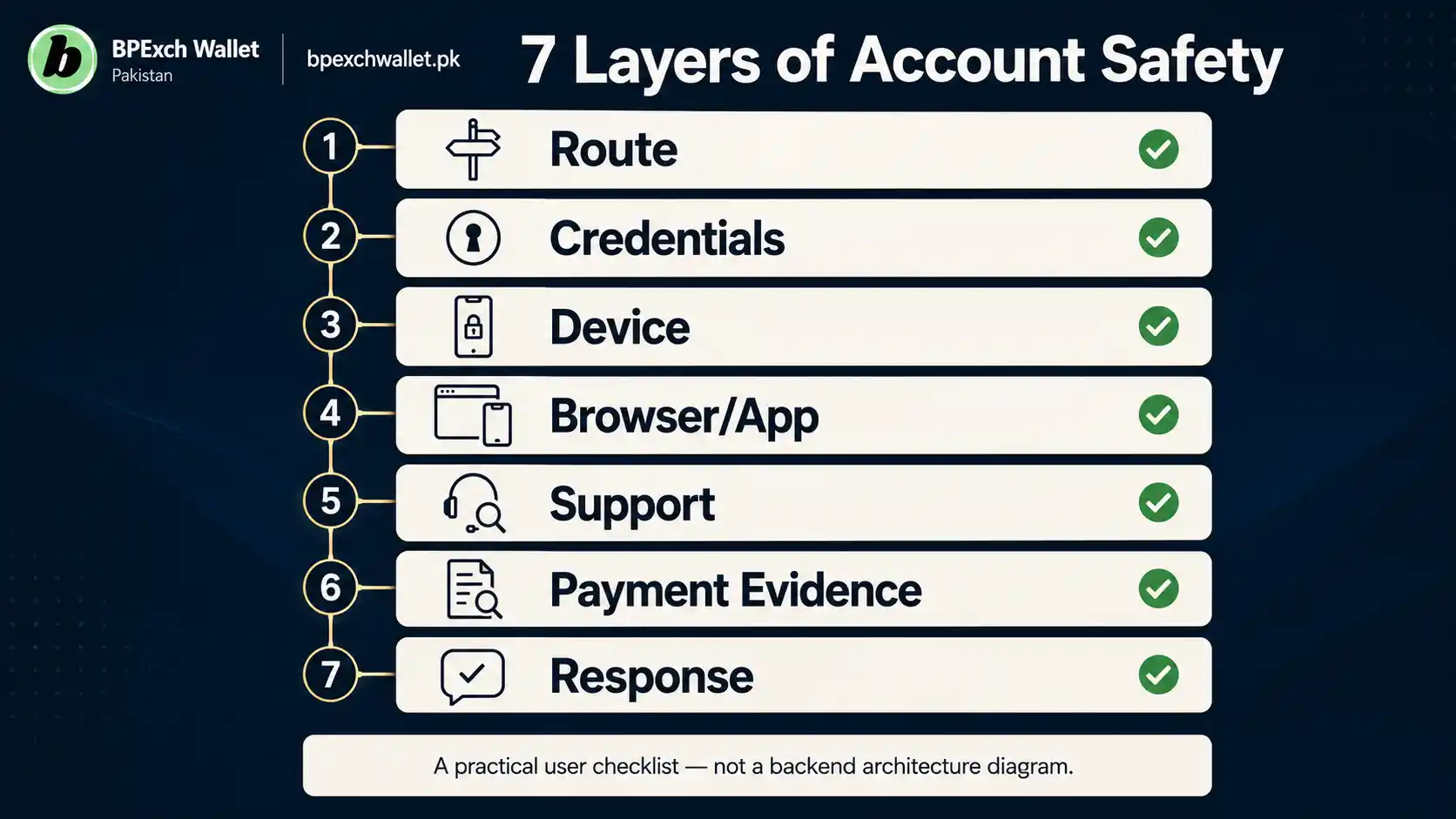
That is why this article uses a layered model. Think of account security as seven connected layers: route, credentials, device, browser or app, support conversation, payment evidence, and response after something looks wrong. A failure at one layer does not automatically mean the account is compromised, but several warning signs together should change what you do next.
Security is not the same as account creation
A user who wants to create an account has a different task from a user who wants to protect an existing one. The BetPro Account guide remains the broad account route for setup, access, status, and account-related navigation. This article does not repeat registration steps, invent required fields, or claim what documents a user must provide.
The security question begins after you decide which route you intend to use. Are you opening the page you meant to open? Are you entering credentials in the right place? Are you giving a support contact only the information needed to understand the issue? Are you installing software from a route you have already verified? Those are security decisions, not signup instructions.
This boundary matters because people often search phrases such as “betpro account secure sign up” or “betpro account secure app.” The extra words do not always justify a new process. In many cases, the safer answer is to use the correct signup or app guide and apply the security checks in this article around that task.
Password security is only one layer
Passwords remain important because reused or stolen credentials can be tested across multiple services. OWASP describes credential stuffing as an attack in which username-and-password pairs obtained from another breach are tried against a different account. That is why a password that is “strong enough” but reused elsewhere can still create risk.
Use a password that is unique to this account and not shared with email, social media, banking, wallets, or other services. A password manager can help generate and store unique passwords. If your browser warns that a saved password appeared in a known breach, treat that as a reason to change the exposed password on every service where it was reused.
Do not invent your own complicated password rules just to satisfy a checklist. Length, uniqueness, and avoiding known or predictable passwords matter more than making a short password visually complex. If the current service offers multi-factor authentication, use it, but do not assume a specific MFA feature exists unless the current account interface confirms it.
Support conversations can become part of the attack surface
Support is useful when something goes wrong, but a conversation can also be copied or impersonated. Pakistan’s National CERT has documented WhatsApp account hijacking and social-engineering risks in which attackers exploit trusted identities and communications. That makes independent route verification important when someone messages you first.
The current BPExch Wallet contact page should be your starting point when you need the site’s support route. Do not rely on a number copied from an old screenshot, an unknown social profile, a forwarded group message, or a person who claims they can “secure” the account if you first send a password or code.
Security improves when the suspicious interaction is not allowed to verify itself. If a message feels wrong, leave that chat or page, open the current contact route separately, and describe the issue without forwarding secret credentials.
What Works: BetPro Account Secure Checklist for Pakistan
1. Start from a route you already trust
The first check happens before login. Use a known bookmark, the current BetPro Account guide, or another route you have already verified. If you arrive from search, a message, an advertisement, or a forwarded link, read the full destination before entering account information.
On mobile, expand the address bar rather than judging the page by its logo, colors, favicon, or title. Those visual elements can be copied. Google Chrome’s Safe Browsing guidance notes that phishing pages may imitate familiar sites and that browsers can warn about deceptive or unsafe destinations. Do not disable a browser warning just because the page looks professional.
A secure habit is repeatable: known start, inspect destination, then authenticate. That is stronger than trying to memorize every possible fake domain.
2. Use one unique password for this account
A unique password limits the damage caused by a breach somewhere else. If the same password protects your email, social account, wallet, and BetPro-related access, one leaked credential can create several problems at once.
Use a trusted password manager if that helps you create and store a long unique password. Avoid sharing the password in chat, notes that other people can open, screenshots, or messages to yourself on a shared device. Do not reuse a password simply because it is easy to remember.
If you believe the password has been exposed, use the current BetPro ID password guide for the site’s password-help route. This article does not reproduce the reset workflow because recovery steps can change and because password recovery already has a dedicated owner.
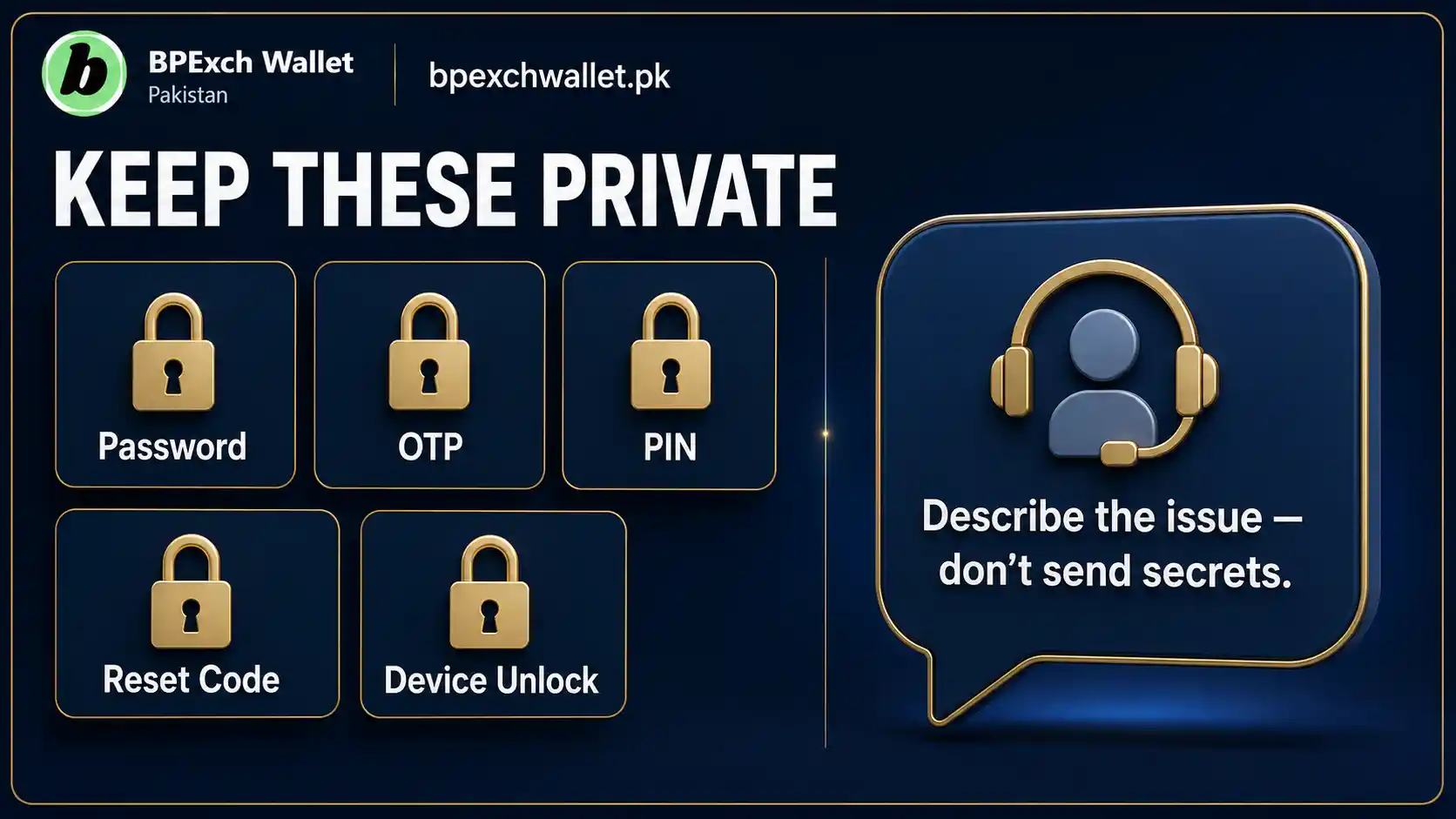
3. Keep OTPs, PINs, reset codes, and passwords private
A password is not the only secret that can authorize access. One-time codes, reset codes, PINs, recovery links, and device approvals can also matter. Treat them as private unless the current trusted interface itself asks you to enter them as part of the action you initiated.
Do not send a code back to a person who says they “need it to verify you.” Do not paste a password into a support chat. Do not put a reset code into a screenshot. If a message arrives unexpectedly with a code, do not assume the sender requesting it is legitimate simply because they know your name, phone number, or account label.
OWASP’s authentication guidance supports layered defenses against password attacks, while its transaction-authorization guidance explains why authorization credentials need careful handling. The practical user rule is easier: secrets belong inside the trusted action, not in a separate conversation.
4. Verify the login destination before every unusual login
Routine logins can make users less observant. The highest-risk moment is often an unusual one: a new phone, a different browser, a message saying the account needs urgent verification, or a link claiming your session has expired.
When the context changes, verify the route again. Check the hostname, browser warning, source of the link, and whether the page is asking for information that fits the task. If your problem is specifically login access, use the BPExch Wallet login guide or the BetPro ID guide rather than following an unfamiliar “fix” link.
If a page asks you to install an extension, download a “security tool,” disable browser protection, or grant remote device access before you can log in, stop. That is not proof of fraud by itself, but it is enough reason to verify outside the flow.
5. Protect the phone or computer that holds your session
An account can have a unique password and still be exposed through an unlocked or compromised device. Use a screen lock that other people cannot easily guess. Keep the operating system and browser reasonably current. Remove software you no longer trust or use.
Shared devices deserve extra caution. Avoid saving credentials in a browser profile that other users can open. Sign out when you finish. Do not leave screenshots of account details in a public gallery or downloads folder. If the device belongs to a shop, office, friend, or shared household, assume another person may be able to view browser history or saved files.
On Android, keep Google Play Protect enabled and review unusual app permissions. For deeper app and download safety, use the BPExch Wallet fake-app and login-link safety guide rather than installing a file that promises to “secure” or unlock an account.
6. Treat remote-control requests as high risk
Remote-access software can let another person see or control your screen. That may be useful in legitimate technical support environments, but it also creates obvious risk when account credentials, payment apps, messages, or private files are visible.
Do not install remote-control software simply because a stranger says it is required to verify your BetPro account. Do not share a screen while typing passwords, OTPs, wallet PINs, or recovery codes. If remote assistance is ever genuinely necessary for a separate device problem, close sensitive accounts first and understand exactly what access is being granted.
The safest support model is task-specific. Explain the error, share only the non-secret information needed to understand it, and follow instructions you can verify. A person who pressures you to surrender device control before explaining the issue should not be your only source of verification.
7. Check screenshots before you send them
Screenshots are convenient evidence, but they can quietly expose more than the intended error. Notification banners can reveal codes. Browser tabs can expose email addresses. A wallet screen may show a transaction identifier, balance, recipient detail, or phone number. A password manager prompt may reveal an account name.
Before sending a screenshot, inspect the entire image. Crop unrelated areas when doing so does not change the meaning of the evidence. Never edit a payment or security screenshot in a way that misrepresents what happened. If a support issue can be described without attaching a screenshot, start with the description.
The BPExch Wallet contact page currently advises users to avoid unnecessary personal information. Follow that principle broadly: enough evidence to identify the problem, but not a collection of secrets “just in case.”
8. Separate payment evidence from login credentials
A deposit or withdrawal problem can turn into a credential problem when users share too much while trying to prove a transaction. Payment evidence and login secrets serve different purposes. A payment screenshot should not contain a password, OTP, recovery code, or device-unlock information.
If the issue is a deposit, use the BPExch Wallet deposit guide. If it is a withdrawal, use the BPExch Wallet withdrawal guide. Keep this security article focused on what should remain private around those tasks.
Do not pay an unexpected “security fee” simply because someone says the account must be unlocked or verified. Do not send money to a newly supplied recipient only because the sender uses familiar branding. Recheck the current payment workflow on the relevant guide or support route before acting.
9. Watch for clusters of warning signs
One unusual event can have an innocent explanation. Several together deserve more caution. Examples include a login page on an unfamiliar hostname, urgent pressure, a request for a code, an unexpected APK, a support profile that contacted you first, a request to disable security protections, or a demand for remote screen access.
Think in clusters rather than hunting for one perfect scam signal. The more layers that feel wrong, the less reason you have to continue inside the same flow.
This is also a useful defense against polished phishing. A copied page can look convincing, and a hijacked messaging account can come from a familiar contact. Appearance and familiarity are weak signals. Route consistency, expected behavior, credential boundaries, and independent verification are stronger.
10. Know what support should never need from you
A support conversation may need enough information to locate the issue, but that does not make every private credential appropriate to share. Your full password should remain private. So should OTPs, reset codes, wallet PINs, device-unlock codes, and remote-control permissions you did not independently decide to grant.
A legitimate support process can change over time, so this guide does not invent a universal list of fields support must ask for. Instead, use a negative rule: secret authentication material should not become customer-service evidence.
If someone insists that sharing a secret is the only way to prove ownership, stop and verify through the current contact route. A security boundary is most useful when it remains firm under urgency.
11. Use a monthly five-minute account-security check
Security becomes easier when it is routine. Once a month, spend five minutes checking the basics: Is your saved starting route still the page you expect? Is the password unique? Is the device locked and updated? Are there unfamiliar apps or browser extensions? Have you recently shared screenshots that contain more information than intended? Have you received suspicious support or verification messages?
You do not need to change a good password every month simply because the calendar changed. OWASP and modern password guidance generally favor strong unique passwords and changing them when compromise is suspected rather than arbitrary frequent rotation.
The monthly check is about drift. Old bookmarks, forgotten shared-device sessions, unused apps, and saved files accumulate quietly. Cleaning those small exposures is often more useful than reacting only after an obvious incident.
Use a simple exposure triage after something feels wrong
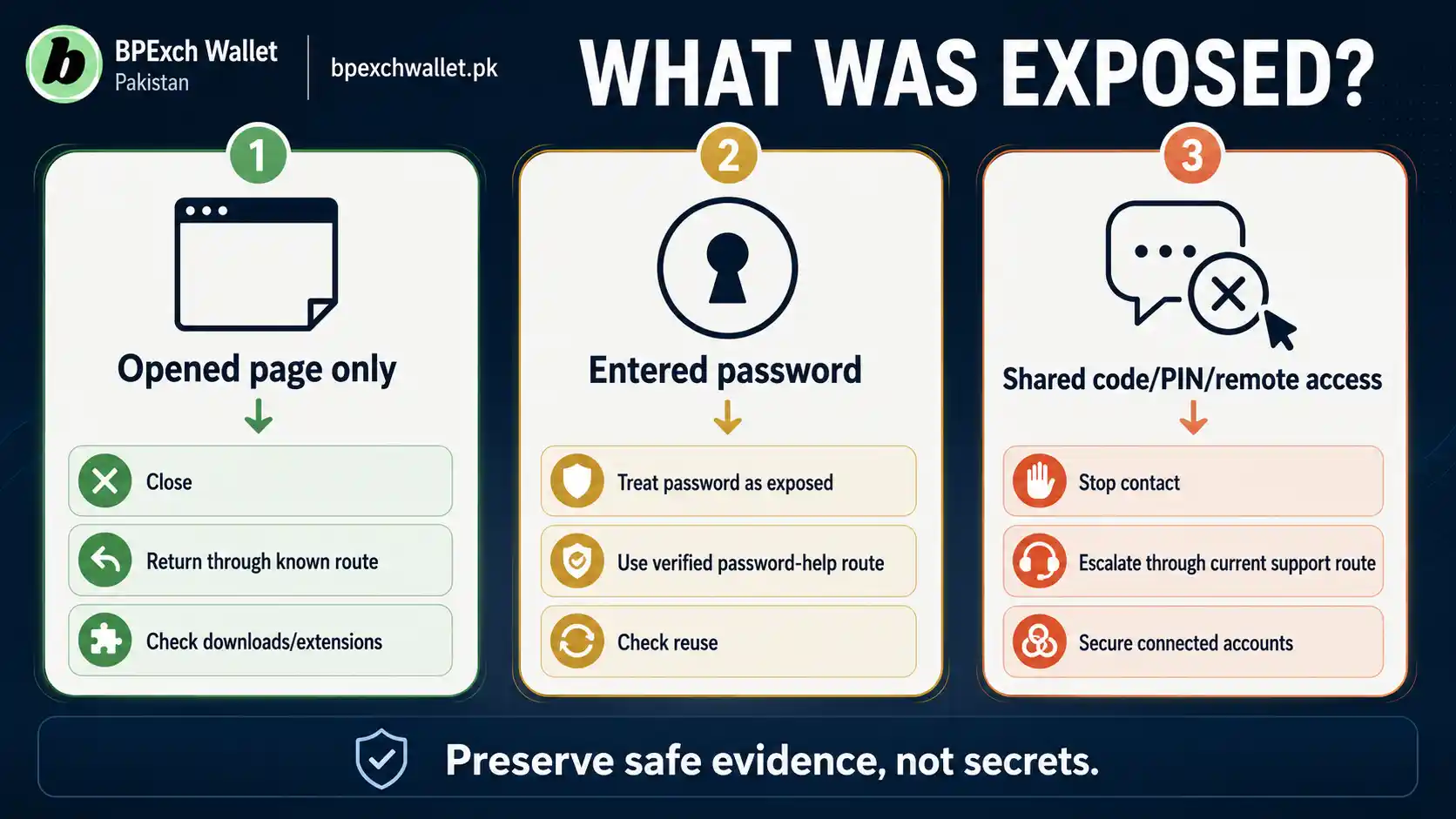
Not every suspicious event requires the same response. First ask what was exposed. If you only opened a questionable page but entered nothing, close it, return through a known route, and check the device for unusual downloads or extensions. If you entered a password, treat the password as exposed and use the verified password-help route. If you also shared an OTP, reset code, PIN, or remote-control access, the situation deserves faster escalation because another action may have been authorized.
Next ask whether the same credential exists anywhere else. Reused passwords create a second problem outside the original account. Change those reused passwords, starting with email or other services that can be used to recover accounts.
Finally, preserve useful evidence without preserving secrets. Note the time, sender, hostname, filename, warning message, or unexpected behavior. A screenshot can help if it does not expose private codes or credentials. This short triage prevents two common mistakes: doing nothing because the problem is uncertain, or taking destructive steps before understanding what actually happened. The goal is proportionate action based on what was exposed, not panic based on how alarming the message looked.
Record facts before changing unrelated settings.
Trade-offs
Strong security adds friction. Reading a hostname, opening a known page independently, using a password manager, locking a device, or checking a screenshot takes longer than tapping through quickly. That friction can feel especially annoying when you are already dealing with a login or transaction problem.
But security friction should be compared with recovery friction. A two-minute verification step can be cheaper than changing reused passwords, cleaning a device, tracing a suspicious payment request, or trying to recover an account after credentials were exposed.
There is also a trade-off between convenience and saved sessions. Staying logged in on a personal device may be convenient, while signing out after every use may feel excessive. The right balance depends on who can access the device. A private, locked phone is different from a shared computer or borrowed handset. Use stricter habits when device ownership and privacy are uncertain.
Another trade-off involves support evidence. A screenshot can make troubleshooting easier, but it can also expose unrelated data. The answer is not “never send screenshots.” It is to inspect them, minimize unnecessary information, and use the current support route.
Finally, security tools are not guarantees. Browser warnings, password managers, Play Protect, antivirus software, and multi-factor authentication can reduce risk, but none can make every page, message, app, or decision safe. Layered checks are valuable precisely because any single defense can fail or be bypassed.
Next Steps
Use this sequence if your goal is to keep a betpro account secure without turning routine account use into a complicated security project.
- Open the BetPro Account guide from a route you already trust.
- Make sure the password you use for account access is unique and not reused on email, banking, social, or other services.
- Keep passwords, OTPs, reset codes, PINs, recovery links, and device-unlock information out of chats and screenshots.
- Recheck the hostname whenever a login arrives through an unusual message, advertisement, redirect, or support conversation.
- Lock and update the device you use, and avoid saving credentials on shared or borrowed devices.
- Do not install unknown “security,” “unlock,” remote-control, browser-extension, APK, or desktop tools because a message tells you to.
- Inspect screenshots before sharing them and remove unrelated sensitive information without changing the evidence.
- Keep deposit and withdrawal proof separate from login credentials, and use the dedicated payment guides for those tasks.
- If several warning signs appear together, stop the current flow and verify through the BPExch Wallet contact page.
- If a password may have been exposed, use the dedicated BetPro ID password guide rather than guessing at a recovery process.
- Repeat a five-minute security review monthly and whenever you change devices or receive an unexpected security message.
Q: Is a BetPro account automatically secure?
No account should be treated as automatically secure. User security depends on the route you use, credential privacy, device protection, support verification, and how you respond to suspicious activity. This article does not certify a platform or guarantee protection.
Q: Should I share my BetPro password or OTP with support?
Keep passwords and one-time authentication codes private. If someone asks for secret credentials in chat, stop and verify the request independently through the current support route. Do not use a secret code as customer-service proof.
Q: What should I do if I entered my password on a suspicious page?
Stop using that page. Open the normal account or password-help route independently, change an exposed or reused password through the current verified process, and review the device for suspicious apps or browser extensions. If the same password was used elsewhere, change it on those services too.
References
This guide uses general security guidance rather than claiming undocumented BetPro-specific security features. OWASP’s Authentication Cheat Sheet and Credential Stuffing Prevention Cheat Sheet explain password attacks, unique credentials, layered defenses, and MFA where supported.
Google Chrome Help explains Safe Browsing warnings for phishing, malware, unwanted software, and deceptive sites, as well as password protection and breach warnings. Pakistan’s National CERT has also published an advisory on WhatsApp account hijacking and unauthorized access, illustrating why trusted-looking messaging identities still require independent verification.
For BPExchWallet.pk navigation, use the current BetPro Account guide, BetPro ID guide, password guide, wallet login guide, deposit guide, withdrawal guide, and contact page according to the task you are actually trying to complete.
Conclusion
A betpro account secure routine should be boring, repeatable, and easy to explain: start from a known route, protect the credential, protect the device, question unusual requests, and verify outside any suspicious conversation. Do not hand over secrets simply because someone creates urgency or uses familiar branding.
If you need broad account help, begin with the BetPro Account guide. If the issue is specifically an ID or password, move to the BetPro ID guide or password help. For support clarification, use the current contact page.
This content is for adults 18+ and is about account and credential safety, not betting advice. Real-money betting involves financial risk. Protecting an account can reduce security exposure, but it cannot guarantee financial outcomes or remove the risks of betting.